The Twitter Tracker KDP Interior: Your Tool for Digital Mindfulness and Strategy
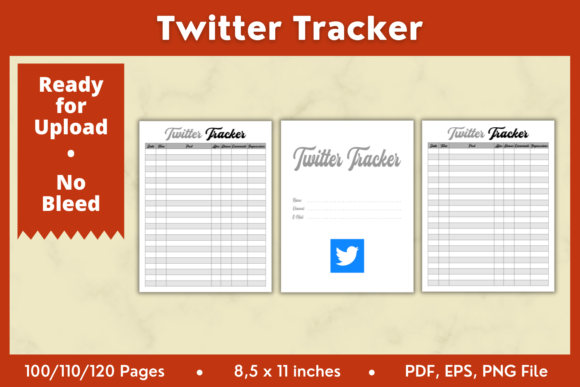
In the constant stream of tweets, trends, and conversations, it's easy to lose track of what matters to you personally or professionally. Whether you're a casual user trying to manage your time, a content creator analyzing your growth, or a business owner monitoring brand mentions, having a structured way to log and review your Twitter activity is invaluable. The Twitter Tracker KDP Interior 8.5x11in is a digital product designed precisely for this purpose. It's a printable and editable interior template that provides a clean, organized framework for you to manually track your Twitter engagement, goals, and observations over time.
This isn't a software or an automated analytics dashboard. It's a physical or digital notebook system, akin to a specialized journal, that encourages you to pause, reflect, and record data intentionally. The downloadable package includes the interior files in PDF, PNG, and EPS formats, giving you flexibility. The PDFs are pre-formatted for Amazon KDP at 8.5 x 11 inches with no bleed, ready for direct upload if you want to publish your own printed tracker journals. The editable EPS and PNG files allow you to customize the design using tools like Adobe Illustrator or Affinity Designer to suit your specific needs before printing or using digitally.
Beyond Simple Note-Taking: Real-World Applications
Imagine you've just launched a small eco-friendly apparel brand. You're using Twitter to connect with potential customers, engage in sustainability conversations, and promote your products. The sheer volume of interactions—replies to your posts, new followers, shares of your content, and mentions from influencers—can become overwhelming data points. A generic notebook might not capture the nuances. Here, a dedicated Twitter Tracker KDP Interior becomes a strategic ledger. You could dedicate pages to log daily follower growth, jot down the context of key mentions (was it positive? did it lead to a sale?), and track which types of tweets (educational infographics vs. product photos) generated the most engagement. This manual log, compiled weekly or monthly, gives you a tangible record to review, revealing patterns that fast-scrolling through a timeline would never show.
For Content Creators and Community Managers
If your income or influence is tied to your social media presence, unstructured activity is a risk. A YouTuber using Twitter to drive traffic to their videos might use the tracker to meticulously record the performance of different tweet formats linking to the same video. They could note the time of posting, the hashtags used, and the resulting click-throughs observed via their YouTube analytics. Over a month, this creates a clear, offline reference for optimizing their cross-platform strategy. Similarly, a community manager for a gaming forum might track sentiment around specific game updates by logging notable user tweets and reactions, building a qualitative report for the development team that goes beyond quantitative metrics.
The Personal Use Case: Digital Wellness and Skill Development
Twitter isn't just for business. Many users are there to learn, network in their field, or simply stay informed. However, the platform's design often leads to passive, endless scrolling. Using a Twitter Tracker KDP Interior transforms your interaction from passive consumption to active curation. A graduate student in political science, for instance, could use it to systematically record key arguments, data points, and expert sources found in threads related to their thesis topic. This turns Twitter into a verifiable research tool. Another individual aiming to improve their digital wellness might use the tracker to log their daily time spent on the platform and their emotional state after engaging in certain debates, helping them identify triggers and consciously reduce negative usage.
Considering Your Needs Before Using a Tracker
The strength of this tool is its flexibility and focus, but it requires a commitment to manual input. Before deciding to implement it, consider your primary goal. Are you seeking quantitative data, qualitative insights, or a mix? The template provides structure, but you define what to record. Also, think about your medium: do you prefer physically writing in a printed journal, which can aid reflection, or filling out a digital PDF on your tablet for easy searching and portability? The included formats support both approaches.
A potential limitation is obviously the manual effort involved. It won't auto-populate data like follower counts. This, however, is also its core benefit—it forces you to engage critically with the data you choose to record, often leading to deeper insights than automated graphs. It's best suited for individuals or small teams who want to develop a nuanced, personal understanding of their Twitter ecosystem, not for large-scale, real-time analytics.
Industries and Purposes You Might Not Have Considered
The application of a Twitter tracker extends into numerous niches. Freelance writers looking for trending topics or public reactions to news events can use it to compile daily logs of emerging story angles and public sentiment, creating a valuable idea bank for pitches. Non-profit organizations running advocacy campaigns can track the spread of their key messages, noting which influencers amplified their posts and what the counter-arguments were, helping them refine their communication. Even hobbyists, like amateur astronomers sharing observations, can use it to record dates, celestial events discussed, and connections made with other enthusiasts, building a documented history of their community involvement.
Each user will benefit differently. The marketer sees a strategy tool; the academic sees a research log; the casual user sees a mindfulness aid. The common thread is the move from reactive scrolling to proactive documentation. The included package—with 100, 110, and 120-page PDF variants, and editable vector files—lets you scale this practice. You can start with a 100-page journal for a three-month experiment or create a custom-designed 120-page version for a year-long professional project. By providing the interior in multiple formats (PDF, PNG, EPS), it accommodates both the quick starter and the seasoned designer who wants to tailor the layout before their KDP upload or personal use.
Making It Work for You
The key to success with any tracker is consistency and customization. Don't try to log everything. Based on your initial considerations, pick three to five key metrics or observations to record daily or weekly. Use the editable files to perhaps add a specific column heading or section title that matches your focus—like "Competitor Mention Analysis" or "Personal Learning Takeaways." The physical 8.5x11 inch size offers ample space for detailed notes. Remember, this tool's value accumulates over time; a week's data gives a snapshot, but three months' data reveals trends, strengths, and opportunities you can act upon with much greater confidence.
In a digital environment optimized for speed and ephemerality, the Twitter Tracker KDP Interior 8.5x11in offers a counterpoint: a framework for slow, intentional review. It turns the chaotic feed into a source of structured, actionable knowledge, whether for your business, your personal growth, or your creative projects.